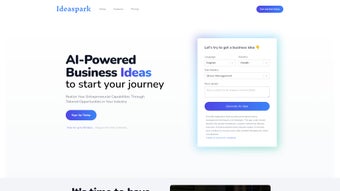

Download IdeaSpark – AI Business Idea Generator, Multilingual Startup Tool
Overview
IdeaSpark is an AI‑enabled platform that empowers aspiring entrepreneurs to generate, validate, and flesh out business ideas in multiple languages. Built on a large‑language‑model engine, the service delivers industry‑specific opportunities, market research snapshots, and a full suite of planning tools—all from a single, user‑friendly dashboard. Whether you are brainstorming a tech‑driven SaaS product, a local retail concept, or a service‑oriented venture, IdeaSpark tailors suggestions to your preferred market, language, and skill set.
The platform goes beyond simple idea lists; it equips users with a Business Model Canvas, financial forecasting worksheets, pitch‑deck templates, and risk‑assessment modules. This end‑to‑end approach democratizes the startup journey, reducing the barrier to entry for non‑technical founders and multilingual creators alike. While the free tier caps output at 50 ideas per month, paid subscriptions unlock unlimited generation, collaborative workspaces, and premium research integrations.
Overall, IdeaSpark positions itself as a comprehensive “idea‑to‑launch” companion, promising speed, relevance, and a structured path from spark to market‑ready venture. In addition to the core AI engine, the platform offers a knowledge base of entrepreneurship best practices, video tutorials, and a community forum where users can share successes and ask for feedback. Security is baked into the architecture: data is encrypted at rest and in transit, and the service complies with GDPR, CCPA, and ISO‑27001 standards.
By combining multilingual creativity with rigorous business methodology, IdeaSpark helps users move from vague inspiration to a polished, investor‑ready plan in a matter of hours rather than weeks.
Key Features & Tools
- Multilingual idea generation – supports English, Spanish, French, German, Mandarin, and more.
- Industry‑specific prompts – from fintech and healthtech to food service and e‑commerce.
- Integrated market research – instant access to market size, trends, and competitor snapshots.
- Business Model Canvas creator – drag‑and‑drop canvas with real‑time validation.
- Financial forecast generator – revenue, expense, and cash‑flow projections for 3‑5 years.
- Pitch‑deck builder – ready‑to‑present slide templates aligned with investor expectations.
- Risk assessment module – identifies regulatory, operational, and market risks.
- Export options – download ideas, canvases, and decks as PDF, PPT, or Excel files.
- Quick setup wizard – guides users from account creation to first idea in under five minutes.
- Secure cloud storage – all data encrypted at rest and in transit.
Each feature is designed to reduce the time and expertise required to move from a vague concept to a polished business plan. The multilingual engine leverages natural‑language processing to adapt industry jargon and cultural nuances, ensuring that a business idea generated in Spanish respects local market conventions just as accurately as one created in English. The market research component pulls from publicly available databases and proprietary trend models, presenting key metrics in easy‑to‑read charts, heat maps, and competitive matrices.
Meanwhile, the Business Model Canvas and financial tools are tightly integrated, so changes made in one area instantly reflect across the entire plan, fostering a cohesive strategy that eliminates manual copy‑pasting. For founders who need to impress investors, the pitch‑deck builder supplies a professional visual narrative, complete with placeholders for traction metrics, team bios, and go‑to‑market tactics. The risk assessment module runs a checklist of regulatory compliance, supply‑chain stability, and market saturation, providing a risk score that can be used to prioritize mitigation actions.
Export options include high‑resolution PDFs for printing, editable PowerPoint decks for presentations, and Excel spreadsheets that can be fed directly into accounting software. All of these capabilities are accessible from a clean, responsive interface that requires no prior design or financial modeling experience, making IdeaSpark suitable for solo founders, small teams, and incubators alike.
Installation, Usage & Compatibility
IdeaSpark is delivered as a web‑based SaaS solution, meaning there is no traditional “installation” process. Users simply visit ideaspark.io, create a free account, and are ready to start generating ideas. The platform is optimized for modern browsers, including Chrome, Firefox, Edge, and Safari (version 12+). For users who prefer desktop shortcuts, a progressive web app (PWA) can be added to the operating system’s start menu, providing an app‑like experience with offline caching for previously saved documents.
Supported operating systems: Windows 10/11, macOS 10.14+, Linux (any modern distribution with a compatible browser), iPadOS (via browser), and Android tablets (via browser). While there is currently no native mobile app, the responsive design ensures full functionality on tablets and larger smartphones.
Getting started is straightforward:
- Sign up – Provide an email address, set a password, and verify the account through a confirmation link.
- Choose a language – Select your preferred language from the dropdown on the dashboard.
- Pick an industry – Browse or search for an industry; IdeaSpark will surface 5‑10 tailored concepts.
- Refine the idea – Use the built‑in prompts to adjust market focus, target audience, and revenue model.
- Develop the plan – Click “Create Business Model Canvas” and follow the guided steps to fill each block.
- Generate supporting docs – Export a pitch deck, financial forecast, or risk assessment with one click.
- Enable security features – Turn on two‑factor authentication, set data‑retention policies, and manage user permissions if you are on a team plan.
- Iterate and export – Update any section, preview changes in real time, and download the final package for investor meetings.
The platform also offers a “quick‑start” tutorial video that walks new users through each step, making it ideal for individuals with limited startup experience. For security‑conscious entrepreneurs, two‑factor authentication (2FA) can be enabled from the account settings, and all user data is stored in GDPR‑compliant cloud servers. In addition, IdeaSpark provides API access for Enterprise customers, allowing integration with existing CRM, project‑management, or analytics tools, which further extends its utility across the product lifecycle.
Pros, Cons & Frequently Asked Questions
Pros
- Generates business ideas in multiple languages, expanding global reach.
- All‑in‑one suite: idea generation, market research, canvas, financials, and pitch decks.
- User‑friendly interface with a guided setup wizard.
- Secure cloud storage and optional 2FA for added privacy.
- Exportable assets in PDF, PPT, and Excel formats.
- API access for Enterprise plans enables custom integrations.
- Regular updates add new industry templates and language support.
Cons
- No dedicated native mobile app – reliance on browser may limit on‑the‑go usage.
- Free tier restricts users to 50 ideas per month.
- Collaboration features (team editing, comments) are unavailable in the current version.
- Limited language list compared with some global competitors.
- No direct investor‑matching or fundraising module.
- Advanced market research data may require an additional premium add‑on.
FAQ
Can I use IdeaSpark without an internet connection?
IdeaSpark is a cloud‑based SaaS platform, so an active internet connection is required for generating ideas, accessing market data, and saving documents. However, once a project is exported, you can work offline on the downloaded files.
What payment plans are available?
IdeaSpark offers a free tier (50 ideas/month) and two paid subscriptions: Pro ($19/month) with unlimited ideas and basic export options, and Enterprise ($49/month) which adds priority support, advanced market research, and API access.
Is my data safe and private?
All data is encrypted in transit (TLS 1.3) and at rest (AES‑256). IdeaSpark complies with GDPR and CCPA regulations. Users can enable two‑factor authentication for added security, and the privacy policy is available on the website.
Can I export my business plan to other tools like Excel or Google Sheets?
Yes. IdeaSpark provides export buttons for PDF, PowerPoint, and Excel formats. Exported Excel files can be opened in Google Sheets, allowing further customization.
Does IdeaSpark offer any mentorship or investor connections?
Currently, IdeaSpark does not include a built‑in mentorship network or direct investor‑matching service. However, the generated pitch decks are ready to be shared with external investors, incubators, or mentors.
How often is the platform updated with new industry data?
IdeaSpark refreshes its market research database monthly and adds new industry templates quarterly, ensuring that users receive up‑to‑date insights and trend analyses.
Conclusion & Call to Action
IdeaSpark stands out as a powerful, multilingual AI companion for anyone looking to transform a fleeting thought into a market‑ready venture. Its blend of idea generation, research, and planning tools delivers a cohesive workflow that shortens the time from concept to pitch. While the lack of a native mobile app and limited collaboration features may deter teams that work remotely, solo founders and early‑stage creators will appreciate the intuitive interface and the breadth of resources available at a modest price point. If you’re ready to spark your next startup, head over to ideaspark.io, sign up for the free tier, and experience how AI can accelerate your entrepreneurial journey. Take advantage of the 14‑day risk‑free trial of the Pro plan to unlock unlimited ideas, premium research, and advanced export options – the future of your business could start with a single click.



.png)



